
Share →

Well, nothing like hitting the ground running, my first job at SSW was to join the TFS Migration Team, it was a fun experience, let me tell you how it went.

Update #1 20th January 2010: Have a look at our Rules to better TFS2010 Migration 


Adam put a few guys together:

  • Adam Cogan (Australia) – The team lead who checks everything and makes us follow the rules to better TFS.
  • Eric Phan (Australia) – Created an excellent “Rules to a successful migration from TFS 2008 to TFS 2010 guide”
  • Justin King (Australia) – Justin seems to play the part of devil’s advocate. I looked him up in the company directory and he is a previous employee…I guess you never really leave SSW.
  • Me (Scotland) – The implementer
  • Allan Zhou (Beijing) – My co-conspirator for the implementation

We started at 2:30am (GMT+1) on Saturday morning and we did it in 5 major steps:

  1. Backed up TFS 2008 databases (Some 14GB of data)
  2. Restored databases to new 64 bit server
  3. Installed TFS 2010 Beta 2 64 bit
  4. Run the Upgrade of 2008 data to 2010 Beta 2
  5. Tested the deployment

We completed the migration at 9:15am (GMT+1) on Saturday morning so all in the migration took just less than 7 hours.
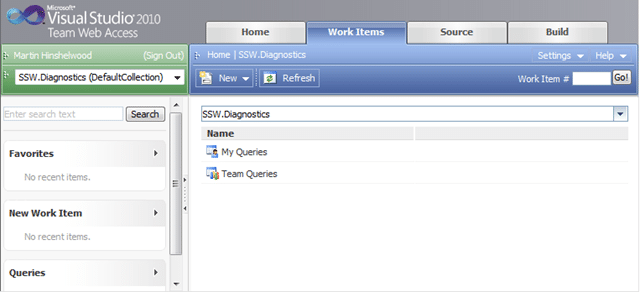
 image

Figure: Web Access – Working

VS2010

Figure: Visual Studio – Working


Well done to the SSW team.

Well done also to the guys involved in the TFS team, the same migration from TFS 2005 to TFS 2008 was a much more painful experience taking days of work, but the guys from SSW made this process easy and straight forward…Preparation does that for a project…

A possible claim to fame: In addition we might have been the first company (SSW is a company of 52 employees and contractors) to migrate. So far I have not seen any blog posts about other companies migrating everything over to Beta 2. I am a TFS MVP and no-one on that list has posted about a migration yet (I can just imagine Justin King having another fit when he finds that out).


Need Help?

www.SSW.com.au

SSW was the first company in the world outside of Microsoft to deploy Visual Studio 2010 Team Foundation Server to production, not once, but twice.

Team Foundation Server

Visual Studi2010 ALM SSW provides expert Visual Studio ALM guidance including installation, configuration and customisation through our four Microsoft Visual Studio ALM MVP’s in three countries; Australia, Beijing and the UK. They have experience deploying to small development shops all the way through to large blue chips.

Professional Scrum Developer Training

Professional Scrum Developer Training SSW has six Professional Scrum Developer Trainers who specialise in training your developers in implementing Scrum with Microsoft’s Visual Studio ALM tools.

  • Grant

    congrats! glad it went smoothly.

  • Bill

    Congratulations and nice job.

  • Lei Xu @ SSW

    thanks Martin, this is working prefectly for us. I just did the upgrade to my VS2008, connect to TFS 2010, check out/in all working. Also I fixed a bug quickly during this testing process ;)

  • Christos

    Does this procedure applies to TFS 2005 migration to TFS2010 as well?

  • venkatarangan tnc

    congrats. this is cool, betting your business on bleeding edge technology

  • checkers instructions

    Visual Studio you are in part assessing Microsoft’s platform, and as that platform has sprawled, so too has the tool. It is now so large that it is difficult to have in-depth knowledge of the entire thing. I also notice this when speaking to Microsoft folk about the product

  • gioca ai casinò

    Microsoft Visual Studio 2010 Ultimate provides an integrated environment of tools and server infrastructure that simplifies the entire application development process To do this, you will need to extract the download files into a single VHD and create a new virtual machine. …..